


Applicable Instructions
This article applies to: Gate Web
Preparation before operation: KYC verification completed, and you hold digital assets eligible for withdrawal
Estimated time required: 2 minutes
Operation Objective
This article will guide you on how to correctly fill in Memo, Tag, or Message information when making a withdrawal on Gate Web.
Steps
Step 1: Locate the MEMO Input Field
On the withdrawal page, check if there is a MEMO input field (for some cryptocurrencies, it may appear as Tag or Message).
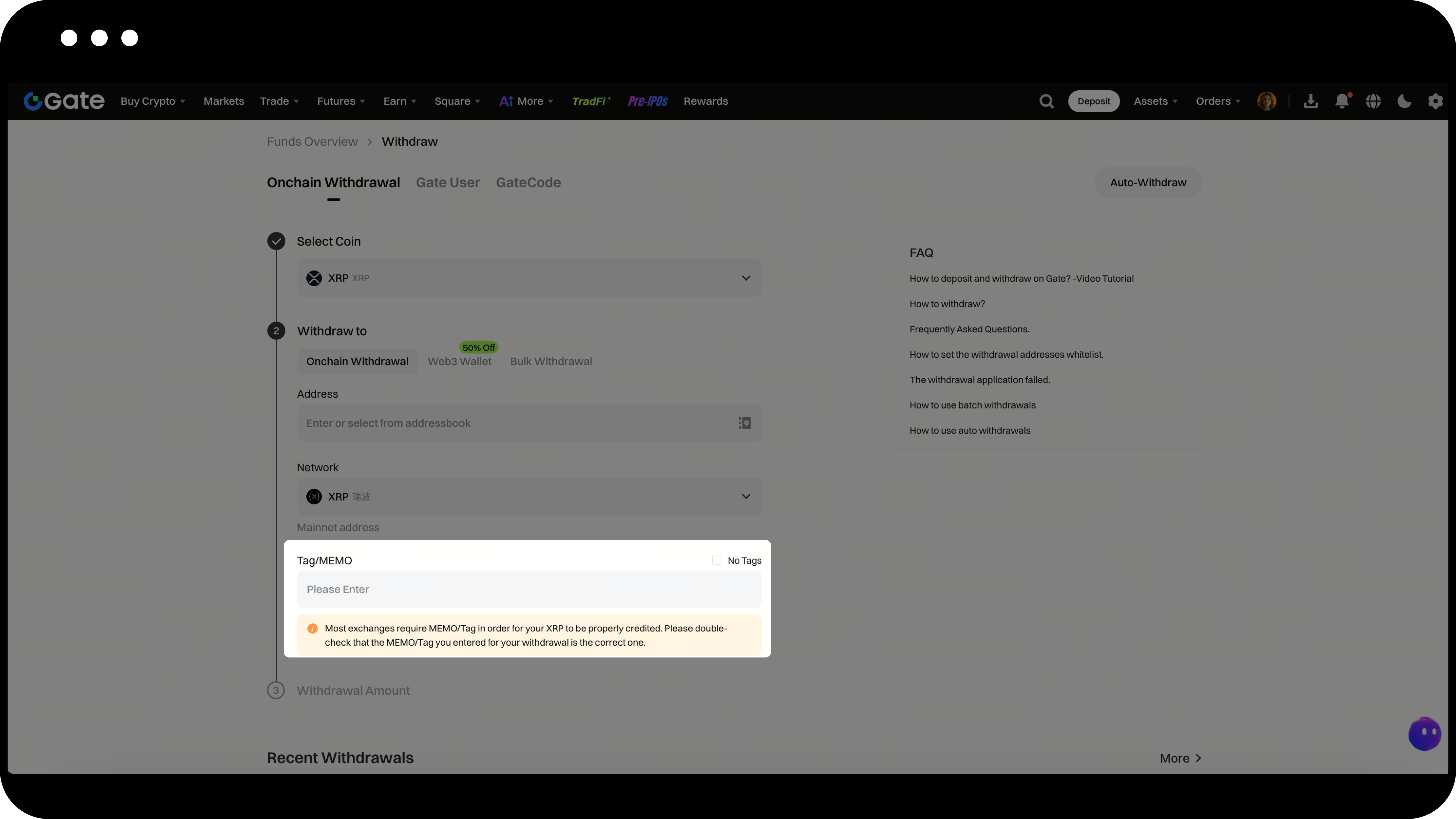
Step 2: Enter Memo Information
If the page displays a MEMO input field, accurately enter the corresponding Memo, Tag, or Message content provided by the recipient in this field.
Step 3: Handling Cases Without an Input Field
If Gate does not provide a MEMO input field for the current cryptocurrency, please contact customer support as follows:
- Click the online customer support icon at the bottom right corner of the homepage to explain your request
- Send an email to the official customer support address (support@gate.com)
Important Notes
- Memo information must match the recipient’s requirements exactly; incorrect entry may result in asset loss
- Different cryptocurrencies may use different names for the memo field (Memo/Tag/Message), but the function is the same
- If you need to add a memo input field for a specific cryptocurrency, please contact the customer support team promptly
Frequently Asked Questions
Q1: What is Memo/Tag/Message?
A: These are additional information fields used in blockchain transfers, mainly for platforms like exchanges to identify the specific recipient account. Certain cryptocurrencies (such as XRP, XLM, EOS, etc.) require these fields to be filled in during transfers; otherwise, assets may not be credited correctly.
Q2: What should I do if I entered the wrong memo?
A: Please contact the recipient platform’s customer support immediately, provide the complete transaction hash (TXID) and the correct memo information, and the platform will assist in recovering your assets. Gate cannot modify blockchain transaction information that has already been submitted.
Q3: Do all cryptocurrencies require a memo for withdrawal?
A: No. Only certain cryptocurrencies (such as XRP, XLM, EOS, ATOM, etc.) require it. If the withdrawal page does not display a MEMO input field, it usually means that the cryptocurrency does not require this information.
Disclaimer
The content provided herein is for reference and educational purposes only and does not constitute any financial, investment, trading, or legal advice, nor does it constitute an offer or solicitation to buy or sell any digital assets. Gate makes no express or implied representations or warranties regarding the accuracy, completeness, or timeliness of the information contained herein. Product features, interfaces, rules, and fee structures may be updated or adjusted at any time. Please refer to the latest announcements and the actual information displayed on the Gate platform for the most accurate details.
Digital asset investments involve significant risk, and prices may fluctuate substantially. You may lose the entire amount of your investment. Please make decisions cautiously based on your own financial situation and risk tolerance after fully understanding the associated risks. If necessary, you are advised to consult an independent professional financial or legal advisor.
For more information about potential risks, please refer to Gate's Risk Disclosure and User Agreement.
