


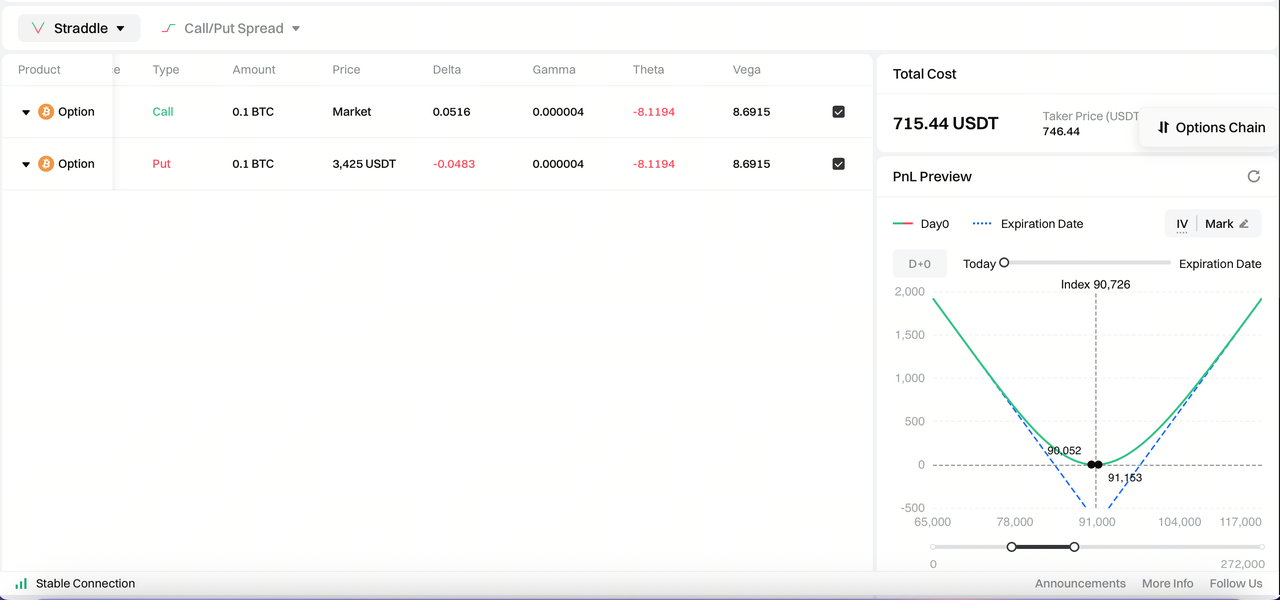
Function Overview
The Strategy Order feature allows users to create multiple option legs (Legs) within a single operation and manage them as a combined strategy. The system provides a unified view of total cost, overall PNL structure, and risk exposure.
By using strategy orders, users can avoid placing each leg separately, making it easier to manage multi-leg option strategies while reducing operational complexity and improving trading efficiency.
This feature is designed for common multi-leg option strategies such as spreads and straddles.
Supported Strategy Types
The Strategy Order feature currently supports the following option strategy structures and will continue to expand with additional strategies:
- Call Spread / Put Spread
- Straddle
Function Details
1.Underlying Asset Selection

Underlying Asset Selection
Used to select the underlying asset for the current option trade. Users can quickly switch between major assets (such as BTC, ETH) to construct corresponding option strategies.
- Supports one-click switching between different underlying assets
- After switching the underlying asset, available expiries, strike prices, and quotes will automatically update
- All subsequent strategy configurations and order placements are based on the selected underlying asset
2.Strategy Selection Area
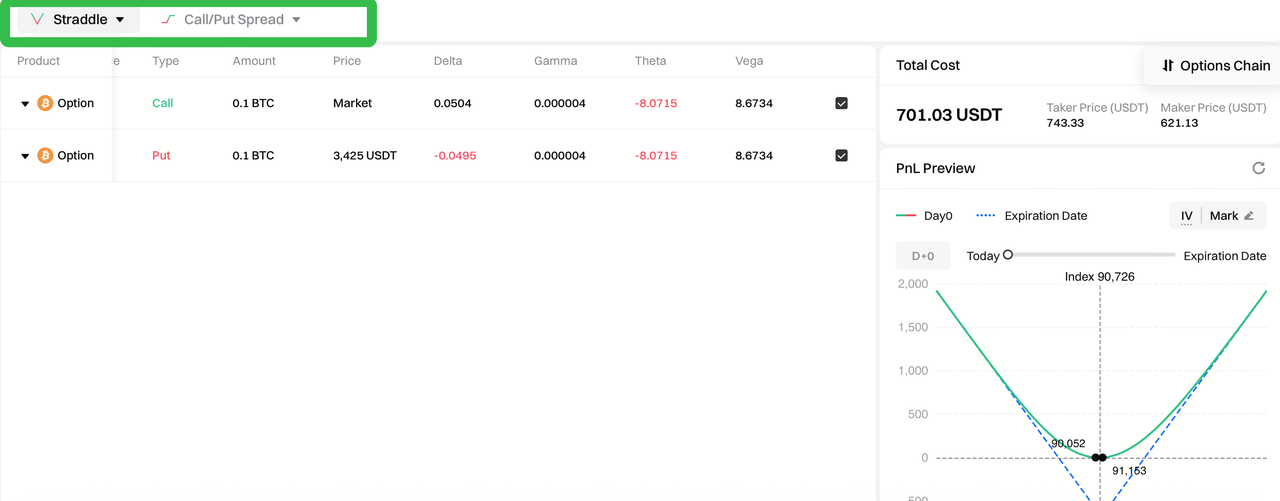
Used to select the type of strategy for combination trading.
- Supports common option strategy types
- Hover over a strategy to select the trading direction (e.g., Long Straddle); the system will automatically initialize the strategy configuration
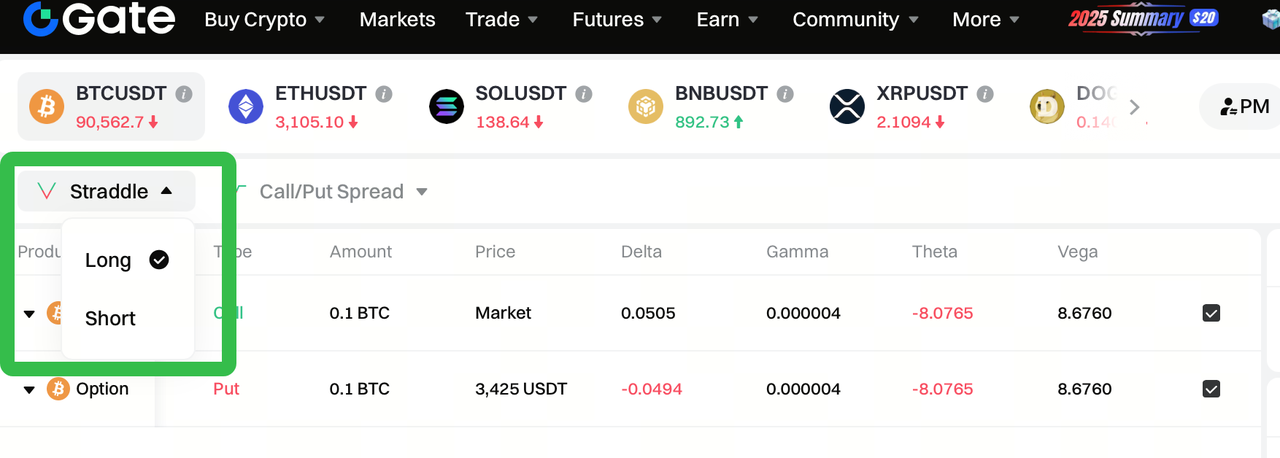
- Custom strategy configurations are not supported at this time
- Different strategy types correspond to different default leg structures and display formats
3.Strategy List

Displays the strategies or option legs currently included in the combination.
- Each row represents one option leg
- Key information is displayed, including direction, expiry date, strike price, option type, and quantity
- Individual legs can be selected or removed
4.Leg Configuration Area
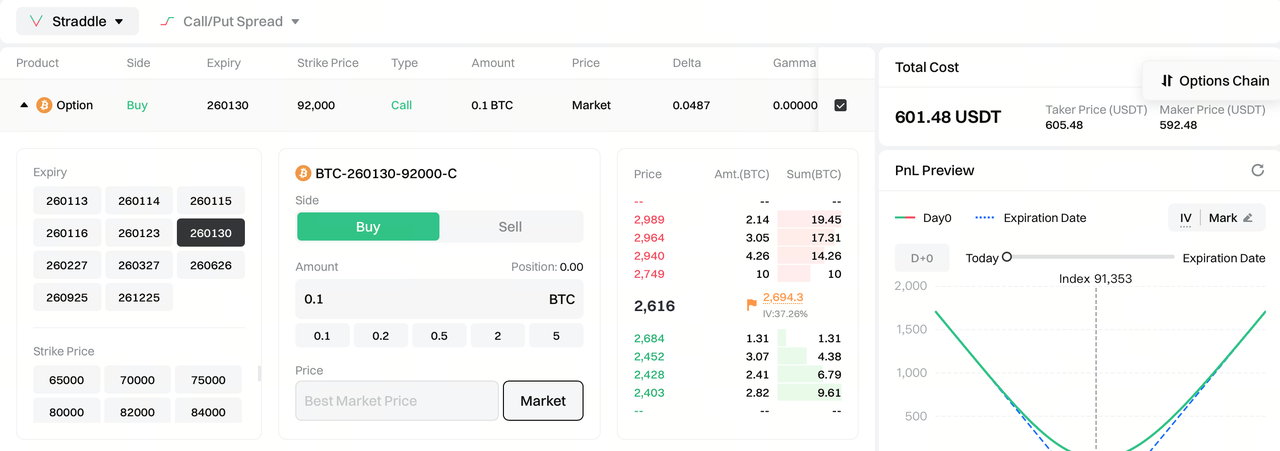
Default State and Expansion
- When the page loads or a new strategy is added, all option legs are collapsed by default
- In the collapsed state, only key summary information is shown (direction, expiry, strike, type, quantity, etc.)
- Click any leg in the strategy list to expand its configuration panel
Supported Parameters in the Leg Configuration Panel
The leg configuration panel follows a left-to-right workflow, guiding users through contract selection and order parameter setup. Configuration includes:
Expiry Selection
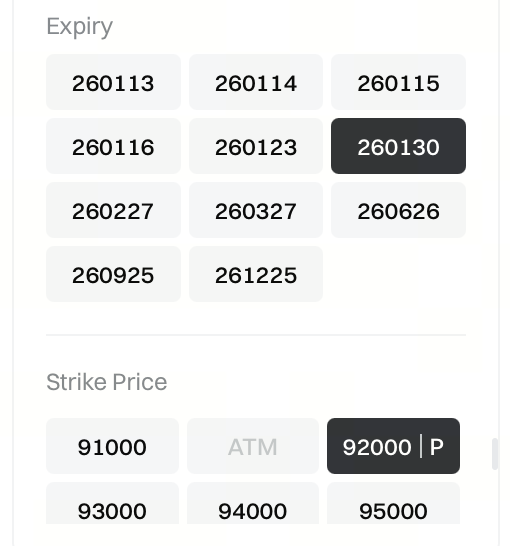
- Available expiries are displayed as a single-select button group
- Each leg can select only one expiry date
- After switching the expiry:
- Strike list, contract name, quotes, and order book will automatically update
Strike Selection (Call / Put Interaction)
-
Strike prices are displayed in a price matrix
-
Hover over a strike price to select:
- C (Call)
- P (Put)
-
Once selected, the system determines:
- Strike price
- Option type (Call / Put)
- Corresponding option contract
Contract Information Display
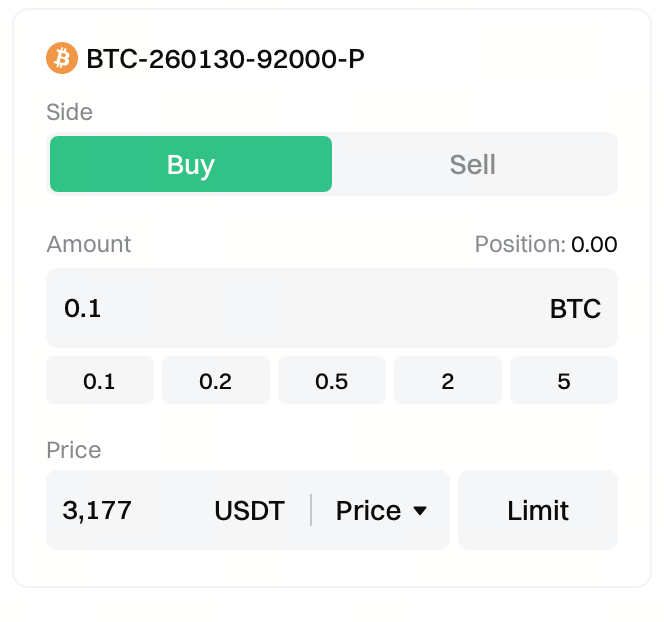
After selecting the expiry and strike price, the system automatically generates and displays:
- Contract name (e.g., BTC-260130-98000-C)
Buy / Sell Direction
- Buy or Sell can be selected independently for each leg
- After switching direction:
- Cost calculation
- PNL preview
- Greeks summary will update in real time
Quantity Input and Position Information
-
Supports manual quantity input
-
Also supports quick quantity selection:
- Click preset quantity buttons below the input field to fill quantities quickly
- Preset quantities adapt to different underlying assets
-
Quantity units match the selected underlying asset (e.g., BTC / ETH)
-
The top-right corner displays:
- Existing position data for the selected contract
- Only positions related to the current contract are shown and do not affect other legs
Price Setting Methods
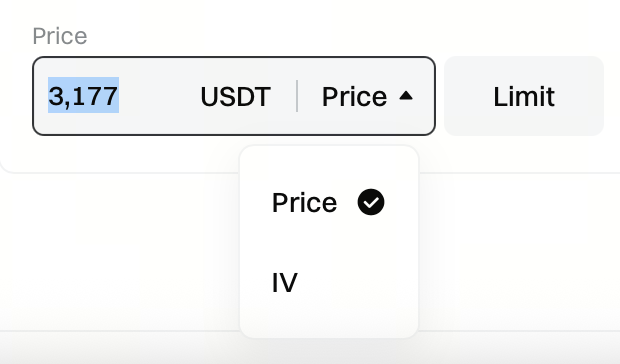
The leg configuration panel supports multiple pricing methods:
- Limit Order: place an order at a specified price
- IV Limit Order: automatically converts a target implied volatility into a price
- Market Order: execute immediately at the best available market price
Switching price types does not affect other leg settings.
Order Book Data
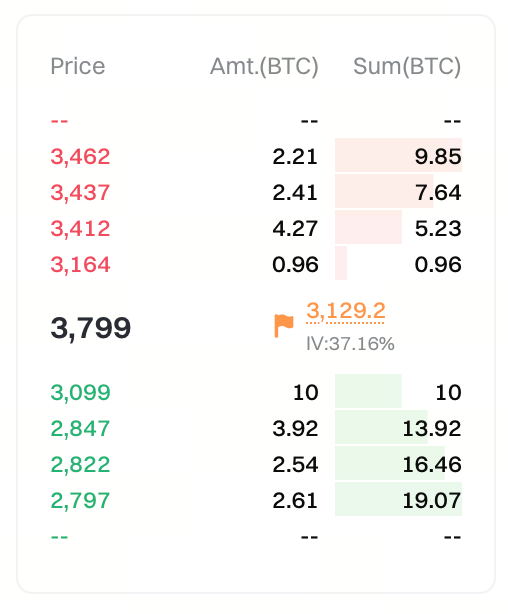
- Displays real-time order book depth for the selected contract
- Includes:
- Order prices at different levels
- Corresponding quantities and cumulative quantities
- Helps users assess liquidity and potential slippage
Default Parameter Logic
-
After selecting a strategy type, the system automatically fills default parameters for each leg, including:
- Expiry date
- Strike price
- Call / Put type
- Buy / Sell direction
- Quantity
-
Users may freely adjust all default parameters in the leg configuration panel
-
All changes are reflected in real time in:
- Cost calculation
- PNL preview
- Greeks summary
5.Cost Calculation Area
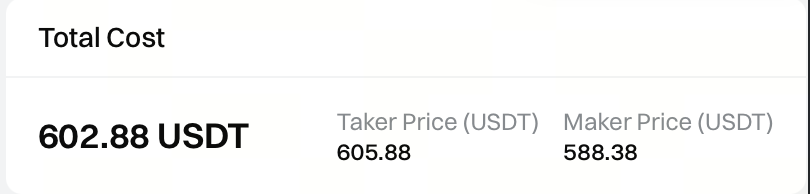
Displays the total cost of the combined strategy in real time.
- Automatically aggregates premiums from all legs to calculate total cost
- Displays reference prices from the order book (e.g., taker price / maker price)
- Cost updates dynamically as prices, quantities, or leg structures change
6.PNL Preview Area
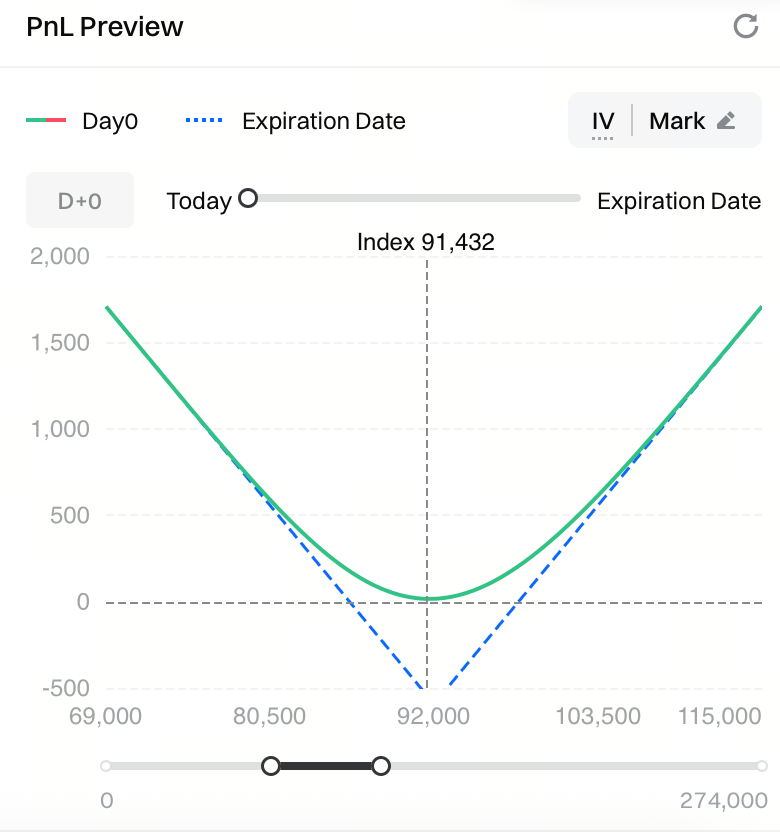
Provides a visual representation of strategy profit and loss across different price levels.
- Supports viewing:
- Day 0 PNL (current time)
- Expiry PNL
- Helps evaluate:
- Break-even ranges
- Maximum loss and potential profit
- Risk exposure across different price ranges
7.Greeks Summary
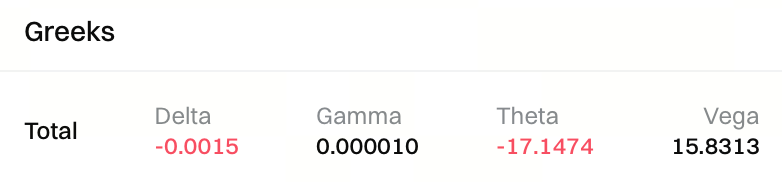
Displays the combined Greeks for the entire strategy.
- Aggregated Delta, Gamma, Theta, and Vega at the strategy level
- Reflects sensitivity to price, time decay, and volatility changes
- Data updates in real time as leg configurations change
8.Place Order Button
Used to submit the combined strategy order.
- Clicking the button submits all legs simultaneously based on current settings
- Before placing the order, please confirm:
- Strategy structure
- Total cost
- Risk and PNL preview
- Actual execution results may be affected by market liquidity
Strategy Order Risk Disclosure
The system supports both single-leg orders and multi-leg strategy orders.
When placing a strategy order , please be aware of the following mechanisms and risks:
- All option legs within the strategy are submitted simultaneously
- If any leg fails to be submitted, the system will automatically cancel other submitted legs to prevent partial strategy creation
Please note that successful order placement does not guarantee simultaneous execution :
- Each leg executes independently, subject to market liquidity
- The following scenarios may occur:
- Only some legs are filled
- Different legs are filled at different times
- Partial fills persist for an extended period
As a result:
- The system cannot guarantee full execution of the strategy
- Execution timing across legs may differ
- Before all legs are fully filled, actual risk exposure and returns may differ from the intended strategy structure
Recommendation: It is recommended to use strategy orders on contracts with good liquidity and to closely monitor execution status after placing an order. If partial fills occur, users should manually manage unfilled legs as needed.
Disclaimer
The content provided herein is for reference and educational purposes only and does not constitute any financial, investment, trading, or legal advice, nor does it constitute an offer or solicitation to buy or sell any digital assets. Gate makes no express or implied representations or warranties regarding the accuracy, completeness, or timeliness of the information contained herein. Product features, interfaces, rules, and fee structures may be updated or adjusted at any time. Please refer to the latest announcements and the actual information displayed on the Gate platform for the most accurate details.
Digital asset investments involve significant risk, and prices may fluctuate substantially. You may lose the entire amount of your investment. Please make decisions cautiously based on your own financial situation and risk tolerance after fully understanding the associated risks. If necessary, you are advised to consult an independent professional financial or legal advisor.
For more information about potential risks, please refer to Gate's Risk Disclosure and User Agreement.
