


Applicable Scope
This guide applies to Gate Web
Before you start: Ensure you have a Gate account and are logged in
Estimated time: 3 m
Objective
This guide will walk you through how to understand and use the order book feature on Gate Web.
Steps
Step 1: Access the Order Book
Log in to Gate Web and navigate to the trading page. Select any trading pair to view its order book, which is displayed prominently on the trading interface.
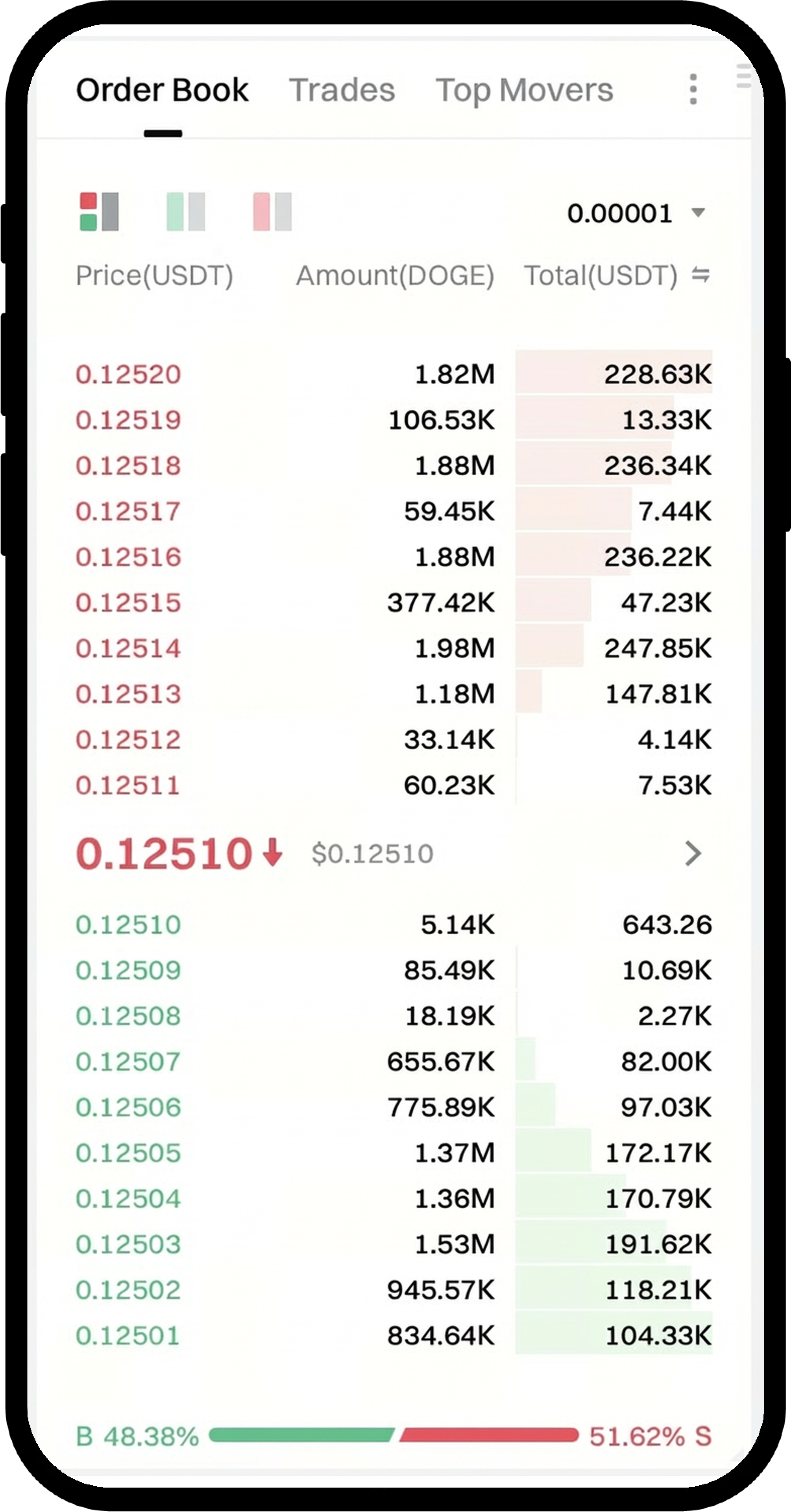
Step 2: Read the Order Book Layout
The order book is divided into two sections:
- Sell Orders (Asks): Displayed at the top, listing prices at which sellers are willing to sell. The lowest sell price is known as "Sell 1" or "Lowest Ask".
- Buy Orders (Bids): Displayed at the bottom, listing prices at which buyers are willing to buy. The highest buy price is known as "Buy 1" or "Highest Bid".
Each price level shows the corresponding order quantity available for trading.
Step 3: Understand the Matching Mechanism
Orders are matched based on two principles:
- Price Priority: The system matches buy orders with the highest price first and sell orders with the lowest price first.
- Time Priority: Among orders at the same price, those placed earlier are executed first.
Step 4: Choose Your Order Type
When placing an order, select from:
- Market Order: Executes immediately at the current best available price shown in the order book.
- Limit Order: Specify your desired price. The order executes if matching orders exist, or enters the order book to wait for a suitable counterparty.
Notes
- Trading digital assets carries significant risks and prices may fluctuate substantially.
- Time priority applies to orders at identical price levels.
- Gate may update product features, interfaces, and fee structures at any time.
- This information is for educational purposes only and does not constitute investment advice.
- Please refer to Gate's Risk Disclosure and User Agreement for comprehensive risk information.
FAQ
Q1: Why did other orders at my price get filled while mine didn't?
A: The matching system follows time priority. If other orders at your price level were placed earlier, they will be executed first before your order.
Q2: How do market orders and limit orders interact with the order book?
A: Market orders immediately consume liquidity from the order book at the best available prices. Limit orders add liquidity to the order book if they cannot be immediately matched, waiting for counterparty orders at your specified price or better.
Q3: Can I modify or cancel my order once it's in the order book?
A: You can cancel any unfilled limit order displayed in the order book. However, you cannot modify an existing order - you must cancel it and place a new order with the desired parameters.
Disclaimer
The content provided herein is for reference and educational purposes only and does not constitute any financial, investment, trading, or legal advice, nor does it constitute an offer or solicitation to buy or sell any digital assets. Gate makes no express or implied representations or warranties regarding the accuracy, completeness, or timeliness of the information contained herein. Product features, interfaces, rules, and fee structures may be updated or adjusted at any time. Please refer to the latest announcements and the actual information displayed on the Gate platform for the most accurate details.
Digital asset investments involve significant risk, and prices may fluctuate substantially. You may lose the entire amount of your investment. Please make decisions cautiously based on your own financial situation and risk tolerance after fully understanding the associated risks. If necessary, you are advised to consult an independent professional financial or legal advisor.
For more information about potential risks, please refer to Gate's Risk Disclosure and User Agreement.
